Starwatch
The night sky, live on your wrist. For Garmin watches.
Get Starwatch on the Connect IQ Store
Raise your wrist to the sky
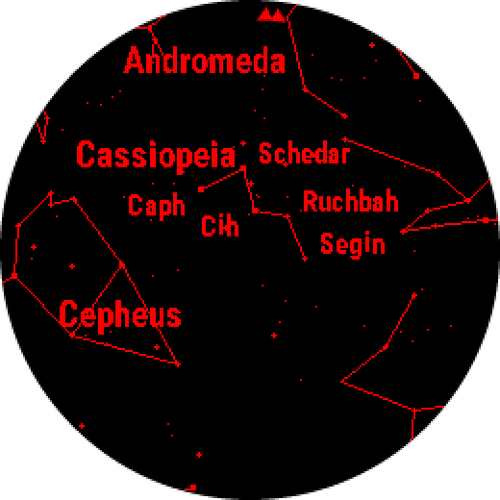
Hold your watch up to the night sky and see exactly what's there. Point the back of your watch at any part of the sky and Starwatch shows you the stars, constellations, planets, Moon and deep-sky wonders in that direction, gliding with your arm as you sweep across the heavens. Turn around and the sky turns with you; point it straight up and you see the stars overhead.
It isn't a chart you scroll through. It's the real sky, worked out on your watch for where you are and what time it is, with every star and planet placed to within about a pixel. No phone, no internet connection and no account: just your watch, its compass and the sky.
Starwatch was made by a stargazer, for stargazers. It packs a planetarium into your watch:
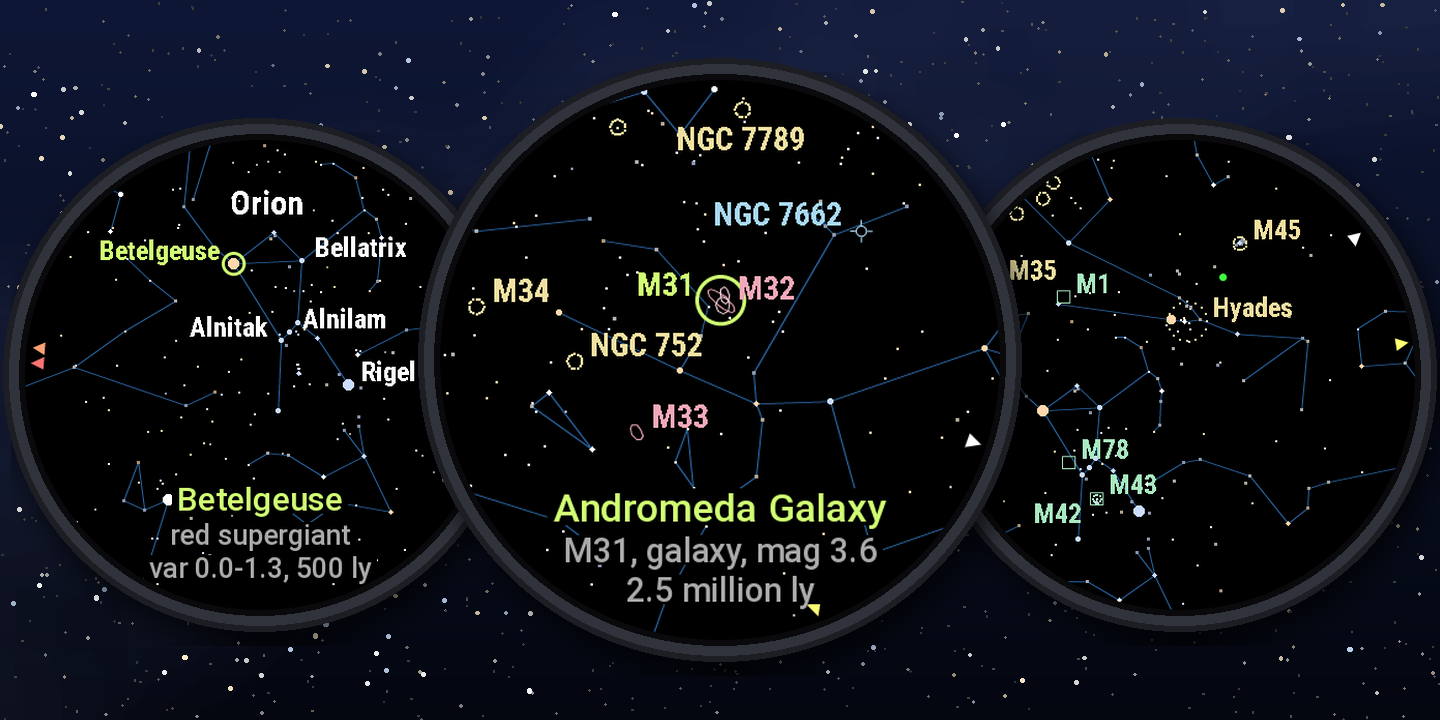
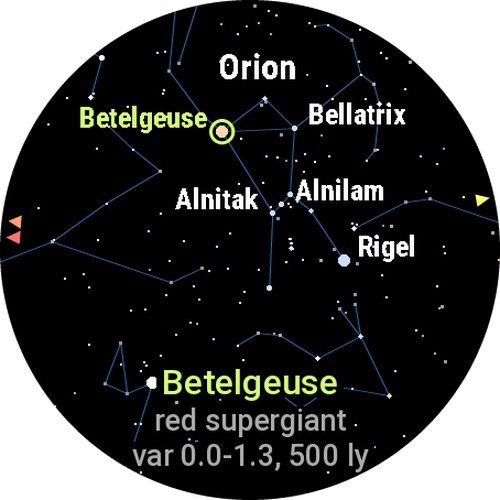
- About 15,000 stars, down to magnitude 7: fainter than most people can see with their own eyes. Each is drawn as bright as it really is, in its real colour: blue-white Rigel, orange Arcturus, red Betelgeuse.
- All 88 constellations, with their lines and names.
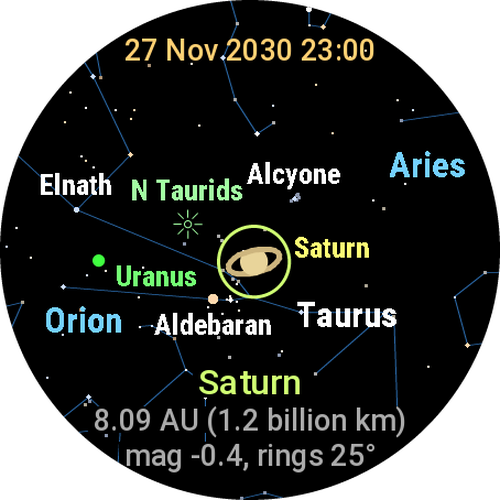
- The Sun, Moon and planets: the Moon with its phase (and its seas, drawn large), Mercury and Venus showing their phases, Jupiter with its cloud belts and Great Red Spot, Saturn with its rings at their real tilt, and Pluto. Ceres, Pallas, Juno and Vesta too, if you like.
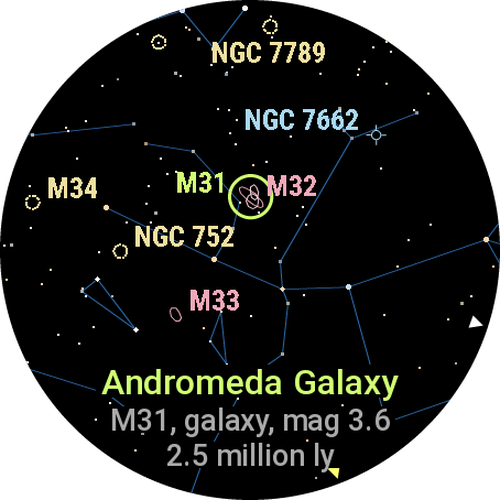
- 150 deep-sky objects: all 110 Messier objects and 40 showpieces from both hemispheres, among them the Double Cluster, Omega Centauri, the Magellanic Clouds and the Carina Nebula. Each has its star-atlas symbol in a soft colour, and the big ones are drawn at their real size and angle, so the Andromeda Galaxy lies across Andromeda just as it does in the sky.
- Pick anything and Starwatch tells you what it is. Betelgeuse: a red supergiant 500 light years away, and how far its brightness swings. A planet: its brightness, its phase and its distance in AU and kilometres or miles, so you can tell whether Venus is on our side of the Sun. Turn away and an arrow leads you back to it.
- Planet pointers: arrows at the edge of the screen show which way to turn for the Moon and the naked-eye planets when they're above the horizon, and how many degrees away they are, if you like.
- Meteor showers: while one of thirteen major showers is active, a symbol marks its radiant, the point its meteors seem to come from.
- Time travel: wind the sky forward or back by an hour, a day, a month or a year. Watch Saturn's rings open over the years, or see tonight's sky at midnight.
- Hold still and fainter stars fill in, the way your eyes adjust to the dark.
- Freeze the view, lower your arm and take your time.
- Red night mode keeps your eyes dark-adapted.
- Optional extras: the ecliptic, the horizon (with the ground shaded below it) and compass points.
Made for your watch
Starwatch runs on 82 Garmin watches with a round colour screen and a compass, from the Forerunner 255 to the fenix 9 Pro. Every one gets fonts, star sizes and colours made for its screen: crisp on the always-on displays, dazzling on AMOLED. It works anywhere on Earth, in both hemispheres, correcting the compass for the difference between magnetic and true north wherever you are. Its menus and words are in English, Chinese (simplified and traditional), Spanish, Italian, French, Portuguese, Indonesian, Russian, German and Japanese.
Contents
- Getting started
- Controls
- Layers
- Picking things
- Freezing the view
- Time travel
- Settings
- Getting the most from it
- Watches it runs on
- Languages
- Questions and answers
- Privacy
- Acknowledgements
- Contact and refunds
Getting started
- Install it from the Connect IQ Store: in the Connect IQ app on your phone, search for Starwatch and install it on your watch (or use the store's website). One purchase covers all your compatible watches.
- Calibrate your watch's compass once, in your watch's settings (usually Settings > Sensors & Accessories > Compass > Calibrate). Starwatch is only as accurate as the compass.
- Go outside and open Starwatch from your watch's apps list (on most watches, press START on the watch face and choose it). The first time, give it a moment to get your position: it switches the GPS on until it has one, then off again.
- Hold your watch up between you and the sky, screen towards you, as if it were a window. The back of the watch points at the part of the sky you're seeing. Sweep your arm around, and up towards the zenith.
- Press UP (or swipe down) to add names and lines, and DOWN (or swipe up) to pick things and find out what they are.
Controls
Watches with buttons
| Button | What it does |
|---|---|
| START | Freeze the view, so you can lower your arm and read it. Press again to carry on. |
| UP | Add the next layer (see Layers). |
| DOWN | Pick the next thing on the screen (see Picking things). |
| Hold UP | Settings. |
| BACK | Let go of whatever's picked; with nothing picked, close Starwatch. |
Touchscreen watches (Venu, vivoactive and similar)
| Touch | What it does |
|---|---|
| Tap | Freeze or unfreeze. |
| Swipe down | The next layer. |
| Swipe up | Pick the next thing on the screen. |
| Hold a finger on the screen | Settings. |
| Swipe right, or BACK | Let go of whatever's picked; with nothing picked, close Starwatch. |
The first few times Starwatch opens on a touchscreen watch, it shows these at the top of the screen.
Layers
UP (or a swipe down) steps through the layers, and round again:
- Stars, with the Sun, Moon and planets.
- + Planet names, and the names of any meteor shower that's active.
- + Lines: the constellations' lines.
- + Constellations: their names.
- + Star names.
- Objects: the deep-sky objects' symbols, with the constellation lines as a guide.
- Objects + names: their labels too, for the eight nearest the middle.
The first time, Starwatch opens showing stars, planet names and lines. After that it opens on the layer you last chose. With the Objects layer setting off, the two Objects layers are left out.
Picking things
DOWN (or a swipe up) picks the next thing on the screen, one at a time:
- the Sun, Moon and planets;
- on the Objects layers, the deep-sky objects, the one nearest the middle first, then round in a spiral;
- then every named star on the screen, brightest first. With Names from set to the middle constellation (the default), the middle constellation's stars come first.
A ring marks what you've picked, and three lines at the bottom of the screen say what it is:
| You pick | Starwatch says |
|---|---|
| Betelgeuse | Betelgeuse red supergiant var 0.0-1.3, 500 ly |
| Venus | Venus 0.72 AU (110 million km) mag -4.8, 31% lit |
| The Andromeda Galaxy | Andromeda Galaxy M31, galaxy, mag 3.6 2.5 million ly |
- A star: its colour and type (from its spectrum: "red supergiant", "yellow giant", "white star"), then its brightness (magnitude: the lower, the brighter) and its distance in light years. For 22 well-known variable stars, such as Betelgeuse and Algol, you get the range their brightness swings through instead of one figure.
- A planet: its distance in AU (the Earth's distance from the Sun) and in kilometres or miles, as your watch is set, then its brightness and how much of it is lit. Saturn shows how far its rings are tilted towards us.
- An object: its catalogue label, its type and its brightness, then its distance.
Turn away from what you've picked and a small arrow at the edge of the screen points the way back. BACK (or a swipe right) lets go of it. Where a line won't fit the round screen, a shorter version is used.
Freezing the view
START (or a tap) freezes the view, so you can lower your arm and look at it properly. FROZEN shows at the top for a moment, then a small pause sign. A frozen view fills in all the stars to your Stars setting, and you can still change layers and pick things. Press START again (or tap) to carry on.
Time travel
Hold UP (or hold the screen) and choose Time travel. Forward and Back move the sky by the Step (1 hour, 1 day, 1 month or 1 year), and Back to now returns to the sky as it is. While it's on, the date and time being shown are at the top of the screen. It isn't remembered: Starwatch always opens on the sky now. It reaches as far as January 2038, where the watch's own clock stops counting.
Settings
Hold UP (or hold the screen) for the settings. Starwatch remembers them, and the layer you last chose, from one use to the next.
- Stars: how faint, from magnitude 5.0 to 7.0 (the default). While you're moving the watch it may show fewer, to keep the movement smooth; hold still and the rest fill in.
- Field of view: 40, 50 (default) or 60 degrees across.
- Constellation names: how many, 1 to 10 (default 3).
- Star names: how many, 1 to 10 (default 5).
- Names from: the middle constellation (default) or the brightest stars in view.
- Show...: what's drawn on the sky:
- Planets: the Sun, Moon and planets (default on).
- Planet size: Normal (about as big as stars as bright), Large (default) or Very large (the Moon's seas, Jupiter's belts and Venus's phase show best).
- Planet pointers: Off, Arrows (default), or Arrows and names (with how many degrees away).
- Pluto (default on) and Minor planets: Ceres, Pallas, Juno and Vesta (default off).
- Objects layer: Off (no Objects layers), Naked eye (objects to magnitude 6, the default), Binoculars (to 9) or All.
- Star colours: Off, Soft or Strong (default Strong on always-on screens, Soft on AMOLED).
- Line brightness: Low, Medium (AMOLED screens) or High, for the constellation lines, ecliptic, horizon and ground (default High on always-on screens, Low on AMOLED, where lines show brightly even at Low).
- Meteor showers (default on): shown only while a shower is active.
- Ecliptic, the path of the Sun, Moon and planets (default off).
- Horizon: Off, Line (default), or Line and ground (the ground below it shaded).
- Compass points: Off, 4 (N, E, S and W: the default) or 8 (adding NE, SE, SW and NW), just above the horizon.
- Time travel: see Time travel.
- Text size: Small, Medium or Large (default Large on always-on screens, Medium on AMOLED).
- Smoothing: Heavy (default), Medium or Light. Heavier is steadier; lighter follows your arm faster.
- Map left/right and Map up/down: fine-tune where the map sits, half a degree at a time, up to 3 degrees either way (default 0), for a compass that's out by a degree or two the same way every time. See The map is always a degree or two out.
- Red night mode (default off).
- Backlight on: keeps the screen lit while Starwatch is open: Off (the watch's own timeout), Watch's level, or a brightness of 25%, 50%, 75% or 100% (default 100% on always-on screens, 50% on AMOLED). Watch's level is the brightness your watch would use itself, which many watches turn down in your sleep hours; a percentage is Starwatch's own (see The screen is dimmer at night). To protect their screens, AMOLED watches don't let any app keep the screen on for more than about a minute without a button press or a touch; it then times out as usual until you next press a button or touch the screen.
- Readouts: where you're pointing, and performance and memory numbers (default off). Useful if you contact me about a problem.
- About: Starwatch's version and credits, on a page you scroll through with UP and DOWN (or swipes).
Getting the most from it
- Hold still for a moment and fainter stars fill in, up to your Stars setting. Move again and Starwatch switches back to a quicker, lighter view.
- Calibrate the compass if the map seems turned away from the real sky, and keep away from metal, cars, speakers and magnets. Indoors, the steel in buildings can throw a compass off by tens of degrees, so Starwatch is at its best outside.
- Use red night mode under a dark sky, so the screen doesn't spoil your eyes' adaptation to the dark.
- Freeze before you read: START or a tap, then lower your arm and take your time.
- Find things by day: Starwatch always shows the sky as if it were dark, which makes it handy for finding the Moon, or Venus in daylight.
- Turn the backlight down or off in the settings (Backlight on) to save power: under a dark sky 25% is often plenty, and in daylight the always-on screens need no light at all.
- Fine-tune the map with Map left/right and Map up/down in the settings if, after calibrating the compass, it's always a degree or two out the same way.
Watches it runs on
Starwatch needs a round colour screen, a compass and enough memory. It runs on these 82 watches:
- Forerunner: 165, 165 Music, 170, 170 Music, 255, 255 Music, 255S, 255S Music, 265, 265S, 570 (42 mm and 47 mm), 70, 955 / 955 Solar, 965, 970
- fenix: 6 Pro / 6 Sapphire / 6 Pro Solar / 6 Pro Dual Power, 6S Pro family, 6X Pro family, 7, 7S, 7X (and quatix 7, tactix 7), 7 Pro, 7S Pro, 7X Pro (including the Solar no-Wi-Fi editions), 8 (43 mm, 47 mm, 51 mm), 8 Pro, 8 Solar (47 mm, 51 mm), 9 (43 mm, 47 mm, 51 mm), 9 Pro (43 mm, 47 mm, 51 mm), 9 Pro Solar (47 mm, 51 mm), fenix E
- epix: epix (Gen 2), epix Pro (Gen 2) 42 mm, 47 mm and 51 mm
- Enduro: Enduro 2, Enduro 3, Enduro 4
- MARQ: MARQ Adventurer, Athlete, Aviator, Captain, Commander, Driver, Expedition and Golfer (Gen 1); MARQ (Gen 2) and MARQ (Gen 2) Aviator
- Descent: Mk2 / Mk2i, Mk2 S, Mk3 / Mk3i (43 mm and 51 mm), G2
- D2: Mach 1, Mach 2, Mach 2 Pro, Air X10, Air X15
- Instinct: Instinct 3 AMOLED (45 mm and 50 mm), Instinct Crossover AMOLED
- Venu: Venu 2, Venu 2 Plus, Venu 2S, Venu 3, Venu 3S, Venu 4 (41 mm and 45 mm)
- vivoactive: vivoactive 5, vivoactive 6
- Approach: S50, S70 (42 mm and 47 mm), S72 (43 mm and 47 mm)
The Connect IQ Store only offers Starwatch to watches on this list. Watches with black-and-white screens (most Instinct models), square screens (Venu Sq, Venu X1), no compass, or very little memory for apps (such as the fenix 6 and 6S without "Pro") can't run it.
Languages
Starwatch's menus, messages and the words for whatever you pick are in English, Chinese (simplified and traditional), Spanish, Italian, French, Portuguese, Indonesian, Russian, German and Japanese. It uses your watch's language; for any other, English. The best-known stars and deep-sky objects have their own names in each language where it has a well-established one: Sirius is 天狼星 in Chinese and シリウス in Japanese, the Pole Star is Estrella Polar in Spanish and Polarstern in German, the Crab Nebula is Krebsnebel in German and Крабовидная туманность in Russian.
The names written on the map itself (stars, constellations, planets, objects' labels) stay in their usual international form in every language: Starwatch draws them with its own small fonts, made for the watch's screen, which only have the plain English letters. The readouts (numbers for support) are in English too.
Questions and answers
Does it work on my watch?
If your watch is in the list above, yes.
Does it work anywhere in the world?
Yes. A compass points to magnetic north, which can be 20 degrees or more away from true north depending on where you are (about 13 degrees in New York, 15 in Seattle, 20 in New Zealand). The sky turns around true north, so Starwatch works out the difference for wherever you are, from the World Magnetic Model, and corrects the compass for it. The one exception is very close to the magnetic poles (Svalbard, the far north of Canada, Antarctica), where any watch compass becomes unreliable.
Where am I? Does it need GPS?
It uses your location to work out which part of the sky is overhead. Open it outdoors the first time and give it a moment. It only needs to be roughly right: a few kilometres makes no visible difference. If your watch has never had a GPS position, "Waiting for GPS" shows at the top until it gets one. Once it has a position, Starwatch switches the GPS off again to save your battery.
The map points the wrong way.
Starwatch relies on your watch's compass. Calibrate it in your watch's sensor settings (usually Settings > Sensors & Accessories > Compass > Calibrate), and keep away from cars, metal railings and magnets. Indoors, steel in buildings can throw the compass off by tens of degrees.
The map is always a degree or two out.
Calibrate the compass first (see above). If the map is still out by the same amount, the same way, every time, fine-tune it in the settings with Map left/right and Map up/down, half a degree at a time, up to 3 degrees. To see how far out it is, find a bright star or planet and hold your watch so that it just hides it, with the screen square-on to your eye: the star should be drawn in the middle of the screen. If it's drawn to the right of the middle, move the map left; if it's drawn below the middle, move the map up; and so on. At the default 50-degree field of view, one degree is a fiftieth of the screen's width.
A red "Compass disturbed" message appears.
The compass is reading a magnetic field much stronger or weaker than the Earth's field where you are, so the map can't be trusted until it clears. Move away from cars, metal railings, magnets and speakers (including your phone), then wait a few seconds. If it stays, calibrate the compass in your watch's settings.
A red "Compass stuck" message appears.
Your watch's compass has stopped updating, which occasionally happens to the watch itself. Restart the watch: turn it off and on again (on most Garmin watches, hold the top-left button and choose Power Off). Then open Starwatch again.
Some directions are right but others aren't (north is right, but south isn't opposite it).
Something magnetic is turning with the watch. Usually it's the watch's own compass calibration (calibrate it as above), or a phone in a pocket near your arm, especially one with a magnetic case or back. To check, turn on Readouts in the settings: held still, the "field" and "dip" numbers on the fifth line should stay about the same whichever way you face. If they change as you turn, calibrate the compass and move your phone to the other side.
It says "No sensor data", or "Sensors stopped".
As it opens, Starwatch shows its name and "Loading..." for a moment while your watch's sensors start. If "No sensor data" or "Sensors stopped" shows instead, press BACK, then open Starwatch again. If it keeps happening, restart the watch.
The screen is dimmer at night.
Many Garmin watches dim the backlight in the sleep hours you've set in Garmin Connect. While it's open, Starwatch sets a brightness of its own (Backlight on, in the settings: 100% on always-on screens and 50% on AMOLED, unless you change it) to keep the screen bright then too. If your watch still dims it, raise the brightness for those hours in your watch's backlight or display settings (on a Forerunner 255, Settings > System > Backlight > During Sleep > Brightness).
The screen blinks or flickers.
Starwatch keeps the screen lit by asking your watch for its backlight about once a second, and again whenever you press a button. If your watch blinks or flickers when an app does this, set Backlight on to Watch's level, or Off, in the settings.
Why do I see fewer stars than my setting while I'm moving?
Moving the view smoothly comes first, so while you sweep your arm Starwatch shows the brighter stars. Hold still for a second and it fills in the fainter ones, up to your Stars setting.
The planets are in the wrong place, or the sky looks wrong.
Check the time and date on your watch. Starwatch works out the sky for the watch's own time and position.
How accurate is it?
Stars and planets are placed to within about a pixel, and the Moon to within a tenth of a degree. The whole view can only be as accurate as your watch's compass, which is usually good to a few degrees.
Can I use it without ruining my night vision?
Yes: switch on Red night mode in the settings. Everything turns red, the colour your eyes' dark adaptation is least sensitive to.
Does it drain the battery?
More than a watch face does, as it reads the sensors many times a second and keeps the screen lit. On a Forerunner 255 it uses about as much as a run with GPS, or a little less. Close it when you've finished, and turn the backlight down or off in the settings (Backlight on) to save more.
Why are the names on the map in English?
See Languages: the map's own fonts only have the plain English letters, so the names drawn on the sky stay in their international form. Pick something with DOWN to see its name in your language.
Do I have to buy it again for another watch?
No. A purchase belongs to your Garmin account and covers all your compatible watches.
Does it collect any data?
No. Your location is used only on the watch, and Starwatch never connects to the internet.
Privacy
Your location is used only on the watch, to work out the sky above you. Starwatch doesn't connect to the internet, and no data leaves your watch.
Acknowledgements
Star positions, brightnesses, colours, spectral types, distances and names: HYG Database v4.1 by David Nash (astronexus.com/hyg), licensed under Creative Commons Attribution-ShareAlike 4.0. Starwatch's star data is adapted from HYG: it's limited to magnitude 7, moved to the positions for 2027, and packed for the watch, and 14 spectral types are corrected from Wikipedia (Creative Commons Attribution-ShareAlike 4.0). That adapted data is shared under the same CC BY-SA 4.0 licence: download Starwatch's star and object data.
Variable stars: brightness ranges from the General Catalogue of Variable Stars (N. N. Samus and others, Sternberg Astronomical Institute, Moscow), as listed in Wikipedia's List of variable stars (Creative Commons Attribution-ShareAlike 4.0).
Constellation lines, names and label positions: d3-celestial by Olaf Frohn (github.com/ofrohn/d3-celestial), used under its licence:
Copyright (c) 2015, Olaf Frohn. All rights reserved.
Redistribution and use in source and binary forms, with or without modification, are permitted provided that the following conditions are met: 1. Redistributions of source code must retain the above copyright notice, this list of conditions and the following disclaimer. 2. Redistributions in binary form must reproduce the above copyright notice, this list of conditions and the following disclaimer in the documentation and/or other materials provided with the distribution. 3. Neither the name of the copyright holder nor the names of its contributors may be used to endorse or promote products derived from this software without specific prior written permission.
THIS SOFTWARE IS PROVIDED BY THE COPYRIGHT HOLDERS AND CONTRIBUTORS "AS IS" AND ANY EXPRESS OR IMPLIED WARRANTIES, INCLUDING, BUT NOT LIMITED TO, THE IMPLIED WARRANTIES OF MERCHANTABILITY AND FITNESS FOR A PARTICULAR PURPOSE ARE DISCLAIMED. IN NO EVENT SHALL THE COPYRIGHT HOLDER OR CONTRIBUTORS BE LIABLE FOR ANY DIRECT, INDIRECT, INCIDENTAL, SPECIAL, EXEMPLARY, OR CONSEQUENTIAL DAMAGES (INCLUDING, BUT NOT LIMITED TO, PROCUREMENT OF SUBSTITUTE GOODS OR SERVICES; LOSS OF USE, DATA, OR PROFITS; OR BUSINESS INTERRUPTION) HOWEVER CAUSED AND ON ANY THEORY OF LIABILITY, WHETHER IN CONTRACT, STRICT LIABILITY, OR TORT (INCLUDING NEGLIGENCE OR OTHERWISE) ARISING IN ANY WAY OUT OF THE USE OF THIS SOFTWARE, EVEN IF ADVISED OF THE POSSIBILITY OF SUCH DAMAGE.
Planets, Pluto and minor planets: orbital elements from NASA's Jet Propulsion Laboratory: "Keplerian Elements for Approximate Positions of the Major Planets" by E. M. Standish, and the JPL Small-Body Database for Ceres, Pallas, Juno and Vesta. The minor planets' orbits were carried forward and the results checked using JPL's DE421 planetary ephemeris.
The Moon: based on Paul Schlyter's "How to compute planetary positions".
Meteor showers: dates, radiants and rates from the International Meteor Organization's 2026 Meteor Shower Calendar (imo.net).
Deep-sky objects: positions, types, brightnesses and sizes from the HYG Database's deep-sky catalogue by David Nash (astronexus.com/hyg), licensed under Creative Commons Attribution-ShareAlike 4.0. Distances from Wikipedia's lists of Messier and Caldwell objects and its pages on the others (Creative Commons Attribution-ShareAlike 4.0).
Planet brightness: A. Mallama and J. L. Hilton (2018), "Computing apparent planetary magnitudes for The Astronomical Almanac".
Magnetic declination (the difference between magnetic and true north): World Magnetic Model 2025, by the NOAA NCEI Geomagnetic Modeling Team and the British Geological Survey (2024), doi.org/10.25921/aqfd-sd83, produced for the US National Geospatial-Intelligence Agency and the UK Defence Geographic Centre. The model is US Government material, not subject to copyright protection in the United States. Starwatch uses a grid of declinations worked out from it.
Text: Roboto Condensed, Copyright 2011 The Roboto Project Authors (github.com/googlefonts/roboto-classic), licensed under the SIL Open Font License 1.1. Starwatch uses bitmap versions of it, drawn at the sizes the watch needs.
Starwatch isn't affiliated with or endorsed by Garmin, NASA, JPL, NOAA, the British Geological Survey, the International Meteor Organization or any of the people and projects above.
Contact and refunds
Found a problem, or have an idea? Use Contact Developer on Starwatch's page in the Connect IQ Store, with your watch model and what happened. If you can, turn on Readouts in the settings and say what they show. If Starwatch doesn't work on your watch, I'll refund you.